Chapter 3. Login at Meteo-40 plus
3.1. Login Options
Once you access the login page of the data logger over the web interface, you may log
into one of four accounts, which have different access rights:
Guest,
Viewer,
User or
Admin.
Figure 3.1. Login Screen
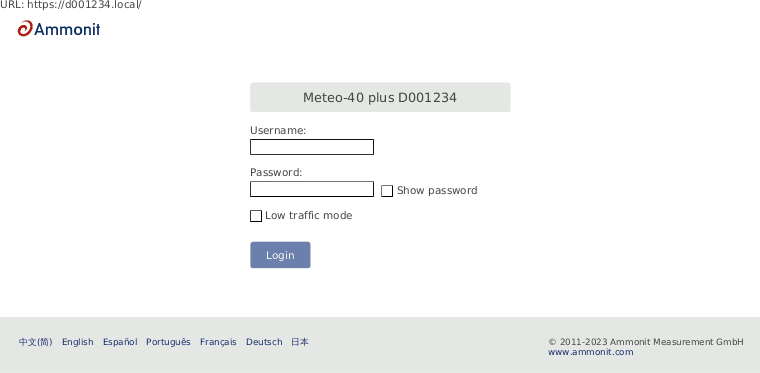
The original access password for each account is enclosed in the data logger's delivery. The passwords are unique for each Meteo-40 plus. All passwords can be changed by an Admin user. Admin users can also create, edit and delete other accounts. (see Section 4.2.1, “User Management” in Section 4.2, “System Administration”).
![[Warning]](admon/warning.png) | Warning |
|---|---|
Be careful if you change the password for the Admin account. A forgotten Admin password cannot be recovered. The data logger must be returned to Ammonit to restore the original password. |
Table 3.1. Accounts and permissions
| Account | Permissions |
|---|---|
| Guest |
|
| Viewer |
|
| User |
|
| Admin |
|
The Meteo-40 plus web interface is available in seven languages: Chinese, English, French, German, Portuguese, Spanish and Japanese.
There is a "Low traffic mode" checkbox which will prevent parts of the page from being updated asynchronously. It is particularly recommended when using BGAN satellite modems.
![[Important]](admon/important.png) | Important |
|---|---|
In order to use all functions of the web interface, activate JavaScript and Cookies in our web browser! |
After login, two links are shown in the upper right corner:
- Help
Access online help.
- Logout
Close the session, when access to the data logger is no longer needed.
Under these links the account you are logged into
(Guest,
Viewer,
User or
Admin) is shown, followed by the serial number of the data
logger.
| Warning |
|---|---|
Be aware that due to security reasons it is not possible to reset the access
passwords. Furthermore, if you change the
|
3.2. Global Control Elements
A is shown in the upper left corner of the Meteo-40 plus web interface. It always shows the most important information and control options.
Figure 3.2. Meteo-40 plus Status Box with Recording Enabled
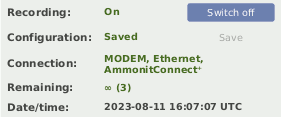
Figure 3.3. Meteo-40 plus Status Box with Recording Disabled
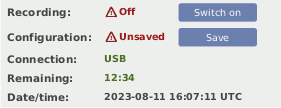
The displays whether Meteo-40 plus is recording data and whether the current configuration is saved. You can switch on or off recording here and save the configuration after having made any changes.
![[Note]](admon/note.png) | Note |
|---|---|
If you switch
|
| Important |
|---|---|
If you switch
If
|
The Meteo-40 plus displays the current established connections
(Connection), e.g. AmmonitConnect via modem or using Ethernet directly in
a LAN. The available connection modes are USB, Ethernet and Modem. If the data logger is
available through the tunnel, it will be shown as AmmonitConnect in the
connections list. If maintenance access is enabled, there will be a superscript plus (⁺)
after AmmonitConnect. The current preferred connection for the Internet
access is written in capital letters.
Additionally, the web interface informs about the remaining time until shut down or
whether CECS is configured to run permanently
(Remaining). In brackets the number of running actions are displayed,
e.g. online access or upload of CSV file.
Figure 3.2, “Meteo-40 plus Status Box with Recording Enabled” shows a Meteo-40 plus with recording on and configuration saved which has a primary modem connection and a secondary ethernet connection (e.g. for SCADA via Modbus TCP). CECS is always on and three actions are running.
Figure 3.3, “Meteo-40 plus Status Box with Recording Disabled” shows a Meteo-40 plus with recording off and configuration unsaved which is connected by USB-B. CECS will remain on for 12 minutes and 34 seconds without further interaction and no actions are running.
The data logger time is also displayed. Color coding is used to indicate the clock accuray. If the data logger time is more than 10 seconds away from the browser time, the time is shown in orange. If it is more than one minute away, it is shown in red with an error icon.