Table of Contents
- 11.1. Connecting Sensors to Analog Voltage Channels
- 11.2. Connecting Sensors to Counter / Period Channels
- 11.3. Connecting Sensors to Digital Channels
- 11.4. Connecting Sensors to Analog Current Channels
- 11.5. Connecting Sensors to Current Source
- 11.6. Connecting Sensors to RS485-M
- 11.7. Using the Switches
In the previous chapter, various sensors have been described, which can be connected to Meteo-40. The sensors have to be connected to the corresponding channel. Depending on the data logger type, Meteo-40 offers up to 35 channels. Meteo-40 provides connectors for the following measurands and signals:
Analog Voltage (DC)
Analog Current (DC)
Pulse Counter / Period
Digital / Serial / Status
RS485-M (master)
Furthermore, the data logger Meteo-40 provides up to two high precision Current Sources to supply passive sensors.
See also Section 1.3, “Meteo-40 Series”.
Meteo-40 is equipped with up to 12 differential voltage inputs, depending on the logger's type. Generally, there are two benefits from differential inputs:
Reduced impact of perturbances and interferences on the signal lines,
Helps to avoid ground loops.
You can find the analog voltage channels (Ax, Bx) on the lower left side of the measuring unit (see Section 1.2, “Overview of Meteo-40”). For example, analog wind vanes, barometric pressure sensors or pyranometers with analog voltage output can be connected to analog voltage channels of Meteo-40.
The analog voltage ranges comprise the following voltage ranges:
±0.1 V,
±1 V,
±10 V,
0.1 V to 0.3 V.
Note: The voltage range 0.1 V to 0.3 V is a high resolution range, especially designed tor use with passive Pt1000 temperature sensors in conjunction with the current sources of Meteo-40.
For further electrical details refer to Section 12.2, “Electrical Characteristics”.
Table 11.1. Analog Channels of Meteo-40
| Channel | Meteo-40S | Meteo-40M | Meteo-40L |
|---|---|---|---|
| Analog Voltage Channels | 4 | 8 | 12 |
The counter channels (C) are located next to the analog voltage channels (see Section 1.2, “Overview of Meteo-40”). For example, anemometers and precipitation sensors can be connected to counter channels. For electrical details refer to Section 12.2, “Electrical Characteristics”.
With data loggers produced since 2017-06, one can use the counter channels C5, C6, C11, and C12 as period measurement channels (P). This is useful for low frequency signals. The channel names are P1 to P4, respectively.
Table 11.2. Counter / Period Channels of Meteo-40
| Channel | Meteo-40S | Meteo-40M | Meteo-40L |
|---|---|---|---|
| Counter Channels | 4 | 8 | 12 |
| Period measurements | 0 | 2 | 4 |
Meteo-40 data loggers produced after 2017-06 can detect rising and falling edges of
a signal connected to P channels. Three different measurement options are implemented:
period, pulse width and duty cycle. These can be configured as
Other Sensor in the
Sensor Helper(see
Section 5.1.2, “Sensor Helper”). If you want to use the period measurement
to connect an anemometer, you must select the
Generic Anemometer PM form the list of sensors.
For the period-related measurements, the first two or three edges in the measurement interval are registered. No averaging is applied for a measurement interval.
![[Important]](admon/important.png) | Important |
|---|---|
The measurement rate must be at least twice as long as the period of the measured signal. If the measurement rate is to short, there might not be enough edges per measurement interval. |
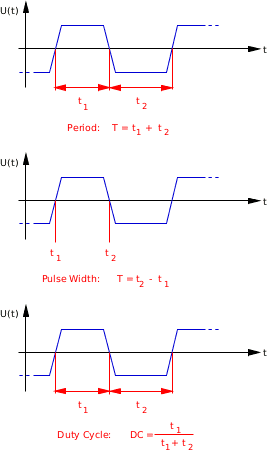
- Period:
The Period is the duration of time of one cycle in a repeating event, so the Period is the reciprocal of the frequency. For the Period measurement, a total of three edges is needed.
- Pulse Width:
The Pulse Width or pulse duration is the time between a rising and a falling edge. At least one rising and one falling edge are needed for this measurement.
- Duty Cycle:
The Duty Cycle is the percentage of the ratio of the pulse width to the total period of the waveform. In this case, at least three edges are needed for the measurement.
Period, Pulse Width and Duty Cycle are illustraded in Figure Figure 11.1, “Illustration of Period, Pulse Width and Duty Cycle.”.
To use digital serial wind vanes Meteo-40 comprises up to eight Digital Channels (D). These Digital Channels are located in the middle of the connection panel of the data logger. For further electrical details refer to Section 12.2, “Electrical Characteristics”.
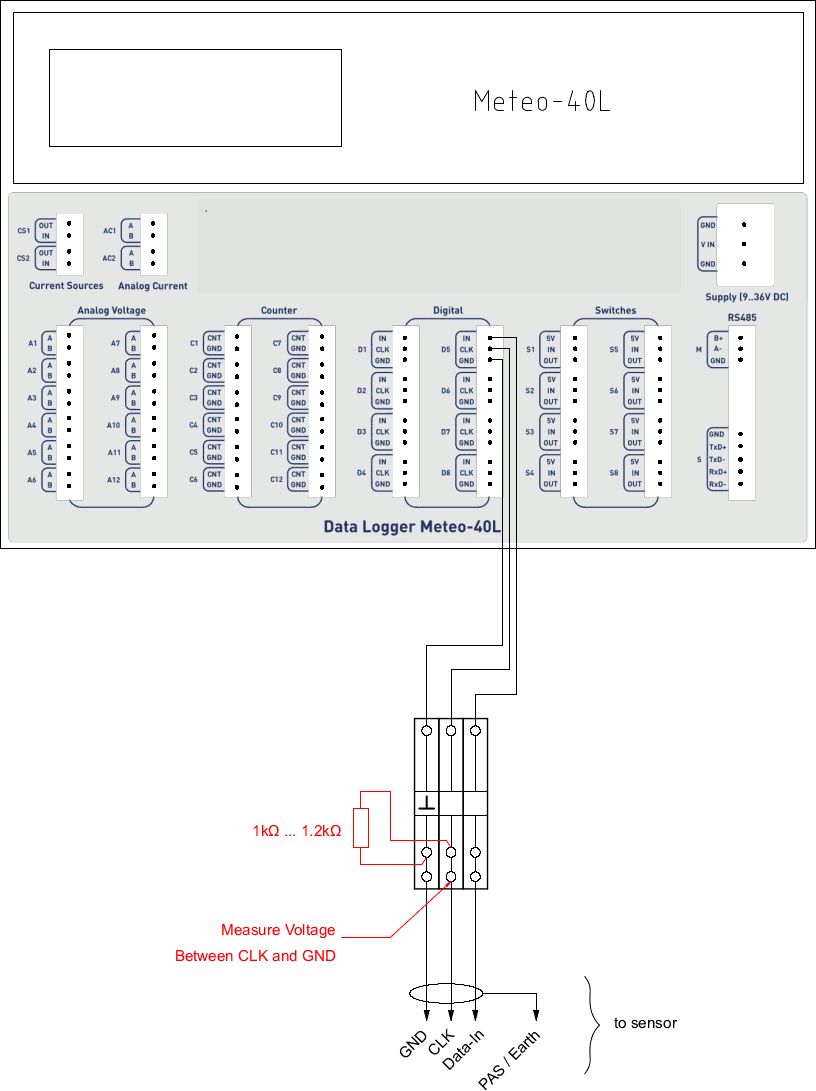
To set up a proper digital connection between the sensor and Meteo-40 it is sometimes necessary to verify the functionality of the Digital Clock Output. The Digital Clock Output sends a short data sequence to the sensor, the sensor should respond with a data sequence on the IN line of the serial interface.
To request data from the sensor the Digital Clock Output must provide voltage levels that can be detected (understood) by the sensor. To simply test the functionality of the Digital Clock Output with a Multimeter, Meteo-40 provides a software driven test procedure. To perform the CLK-Line Output Test do the following:
Disconnect the sensor from the data logger.
Connect the data logger to the PC to configure it via web interface.
Login into the data logger and follow the links
→Press the "Digital test" button below the sensor list.
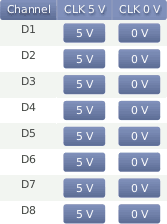
A tabular showing the Digital Channels available on this logger appears. The right columns of the table contain two buttons: "5 V" and "0 V" corresponding to each channel.
Connect the multi meter between CLK output and GND of the Digital Channel you intend to check.
First step: Press the button "5 V" to switch on the DC voltage of the Clock Output. There must be a voltage between 4 V and 5.6 V present at the Clock Output.
Second Step: Add a resistor of 1 kΩ–1.2 kΩ in parallel to the multi meter (see figure Figure 11.3, “Setup for CLK-Line test of Serial Interface.”). Press the button "5 V" to switch on the DC voltage of the Clock Output. The voltage at the Clock Output must not drop below 3 volts.
Notes:
The DC voltage output can be toggled between High- and Low-level via the two buttons "5 V" and "0 V"
The test has limited timespan: After pressing the "
Digital test" button and choosing the DC voltage level, the voltage level will remain only 10 seconds. To repeat the test, the button "5 V" has to be pressed again.
Test Result: If the voltage level drops below 3 volts, the CLK output of the data logger could be defective.
Meteo-40 data loggers offer analog current measurement channels: Meteo-40L provides two channels; Meteo-40M and Meteo-40S one each.
Barometric pressure sensors with current output can be connected to these channels. The current measurement channels offer current ranges of 1 mA, 10 mA and 100 mA which can be configured via web interface.
Table 11.4. Analog Current Channels of Meteo-40
| Channel | Meteo-40S | Meteo-40M | Meteo-40L |
|---|---|---|---|
| Analog Current Channels | 1 | 1 | 2 |
The current source (CS) is located on the left of the communication unit next to the analog current channels (see Section 1.2, “Overview of Meteo-40”). Meteo-40 data loggers are equipped with one or two current sources, depending on the logger's type. The goal of these current sources is to supply passive temperature sensors (PT100 or PT1000).
Single Pt100 and Pt1000 sensors as well as Pt100 sensors, which are for example implemented inside pyrheliometers can be connected to the current source of Meteo-40. For electrical details refer to Section 12.2, “Electrical Characteristics”.
Table 11.5. Current Source Channels of Meteo-40
| Channel | Meteo-40S | Meteo-40M | Meteo-40L |
|---|---|---|---|
| Current Source Channels | 1 | 1 | 2 |
![[Note]](admon/note.png) | Note |
|---|---|
For technical details and electrical characteristics of sensors, refer to the data sheets, which can be downloaded from the Ammonit website. |
All data logger types of Meteo-40 offer an RS485-M (master) slot for bus connection of up to eight sensors with RS485 interface. For further electrical details refer to Section 12.2, “Electrical Characteristics”.
When adding an RS485 sensor in the → menu, a (selectable) channel name between M1 and M8 is assigned to the sensor. Subindexes, e.g., M1_1, M1_2, are created for measured data and evaluations. In the → menu the evaluations are displayed. Both measured values and evaluated data are included in the CSV files and can be seen in the → menu.
Most RS485 sensors have to be configured before use. The same configuration must be applied, when adding the sensors to Meteo-40 in the → menu.
| Important |
|---|---|
Only sensors using the same protocol and serial settings can share the RS485 bus. It is necessary to configure each sensor with a unique RS485 address in the bus. |
| Important |
|---|---|
If 4 or less RS485 sensors are connected, the RS485-M receiver remains enabled for 165 ms. With more than 4 sensors, the receiver enabled time decreases to 40 ms. The sensor response delay and the response transmission itself should happen within this period. |
SDI-12 is a standard communications protocol which provides a means to transfer measurements taken by an intelligent sensor to a data recorder. A subset of the SDI-12 protocol is implemented on Meteo-40. By means of an external hardware, the RS485-M interface can be used to connect SDI-12 sensors. If more than one SDI-12 is connected, the external adapters must be configured with different RS485 addresses. The supported SDI-12 sensors can be found in section Sensors.
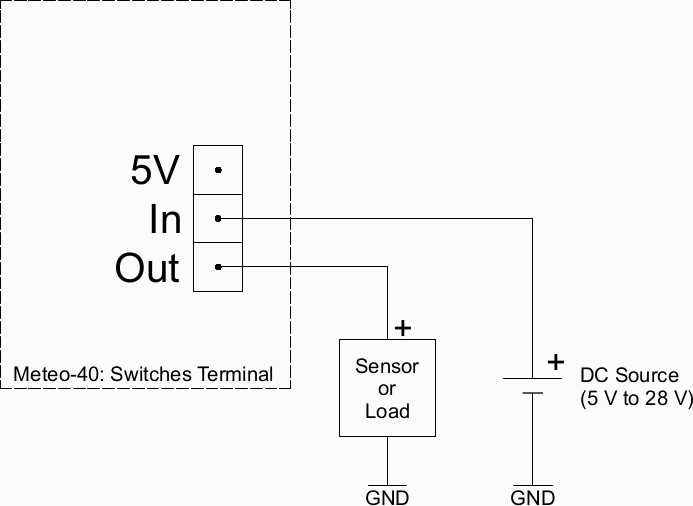
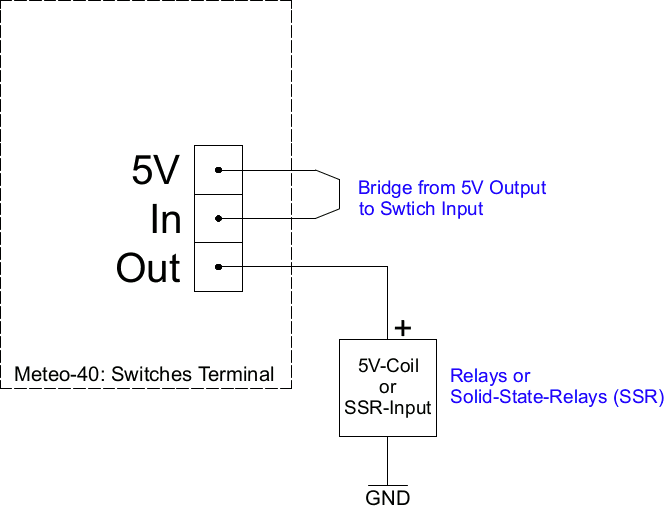
Each Meteo-40 data logger comprises switches to switch different kinds of loads on and off. The number of switches depends on the type of the logger (S, M or L). The switch is internally reasized with a P-channel MOSFET. The loads can be sensors as well as relays (electro-mechanical or solid state). Each switches section consists of three terminals: 5 V output, Input (In) and Output (Out).
Input terminal: This is the input of the voltage to be switched. Note: Input voltage must be positive with respect to ground (GND).
Output terminal: Output of the switch.
5 V Output terminal: The 5 V output can be used as a control voltage for external devices. Furthermore, it can be used as input voltage for the switches.
The following two figures show example circiuts to make clear the use of the 5 V and the switches terminals.